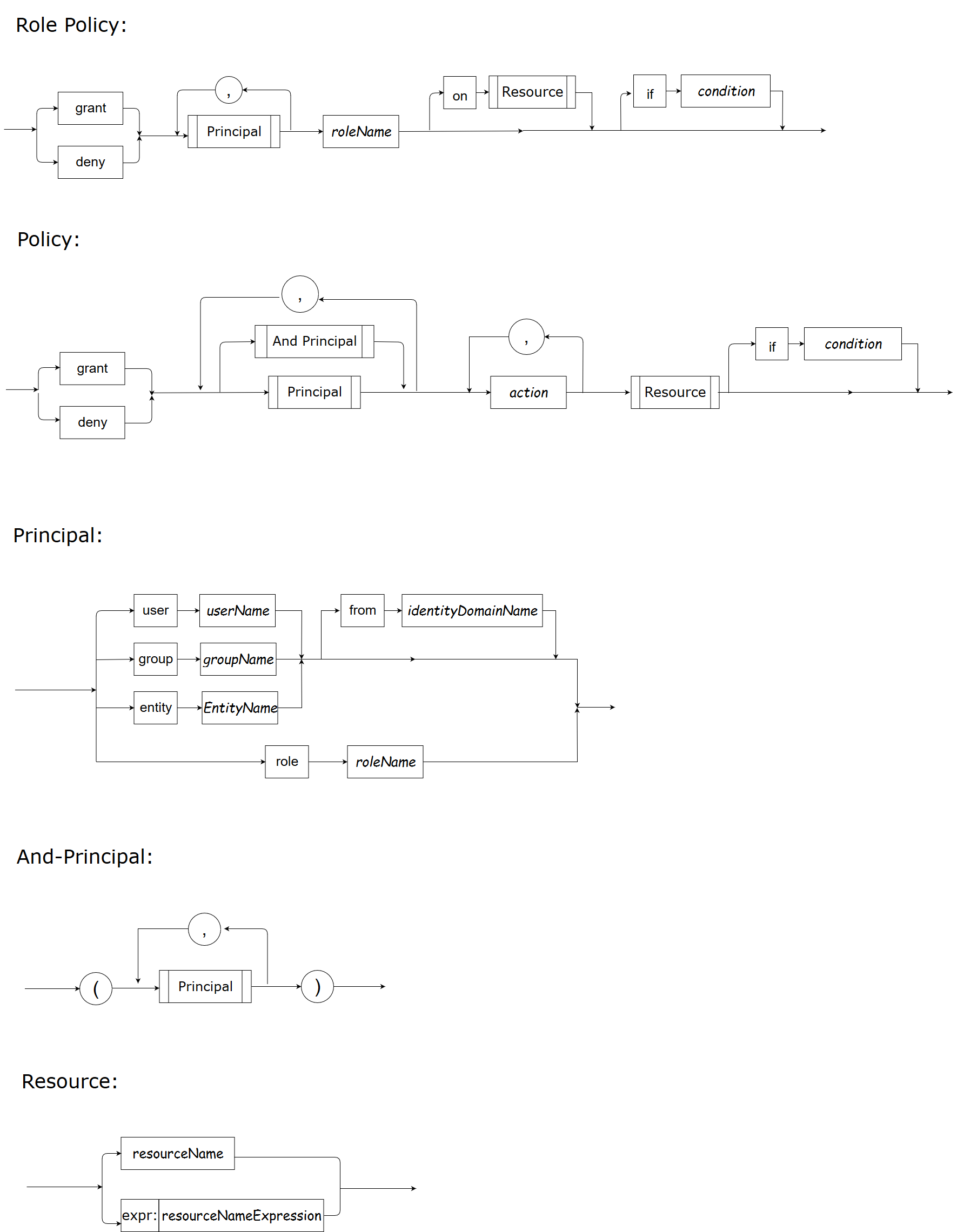
Syntax
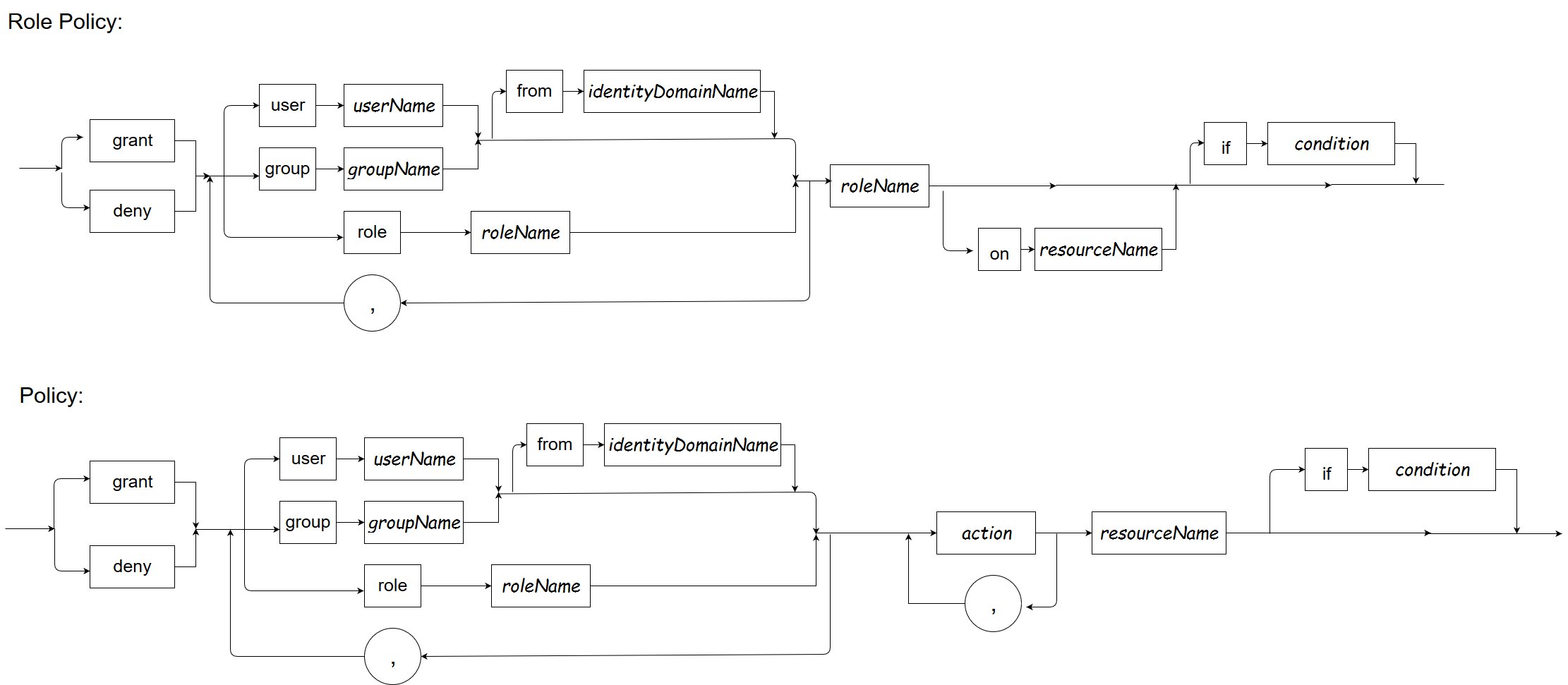
Keywords
grant, deny, user, group, entity, role, from, on, if and in have special meanings in their syntax positions. Statement keywords are case-insensitive. In conditions, use in or IN; function names are case-sensitive. Principal, action and resource names are also case-sensitive. The current parser accepts keyword-like names in some name positions, so a blanket prohibition is not a validation rule. Prefer unambiguous names for review and client interoperability.
Naming Convention
Prefer simple, stable identifiers. Quote names containing whitespace or separators using the parser’s single- or double-quoted form, and test the actual input. Historical Java regular-expression character classes are not a validation contract for the Go parser. The expr: resource prefix uses Go regular expressions, not shell globs. Attribute and function names in conditions are described below.
Syntax
POLICY = EFFECT SUBJECT ACTION RESOURCE [if CONDITION]
EFFECT = grant | deny
SUBJECT = AND_PRINCIPALS (, AND_PRINCIPALS)*
AND_PRINCIPALS = PRINCIPAL | \( PRINCIPAL_LIST \)
PRINCIPAL_LIST = PRINCIPAL (, PRINCIPAL)*
PRINCIPAL = PRINCIPAL_TYPE PRINCIPAL_NAME [PRINCIPAL_IDD]
PRINCIPAL_TYPE = user|group|entity|role
PRINCIPAL_IDD = from IDD_IDENTIFIER
IDD_IDENTIFIER = NAME
ACTION = (ACTION_IDENTIFIER)(, ACTION_IDENTIFIER)*
RESOURCE = RESOURCE_IDENTIFIER
PRINCIPAL_NAME = NAME
ACTION_IDENTIFIER = NAME
RESOURCE_IDENTIFIER = NAME
ROLE_POLICY = EFFECT SUBJECT ROLE (on RESOURCE)? [if CONDITION]
EFFECT = grant | deny
SUBJECT = PRINCIPAL (, PRINCIPAL)*
PRINCIPAL = PRINCIPAL_TYPE PRINCIPAL_NAME [PRINCIPAL_IDD]
PRINCIPAL_TYPE = user|group|entity|role
PRINCIPAL_IDD = from IDD_IDENTIFIER
IDD_IDENTIFIER = NAME
ROLE = (role)? SUBJECT_IDENTIFIER
RESOURCE = RESOURCE_IDENTIFIER
SUBJECT_IDENTIFIER = NAME
RESOURCE_IDENTIFIER = NAME
Condition
1. Overview
Condition is supported in both policy and role policy definitions. The policy or role policy can take effect only when the condition is met.
This document focuses on what a condition is, and how to write a condition.
2. Condition
A condition is a bool expression that is constructed using attributes, functions, constants, operators, comparators or parenthesis and produces a bool value.
2.1 Data Types
The data type of an attribute value and constant can be a string, numeric, bool, datetime or an array of string, numeric, bool, datetime.
The data types and the corresponding supported operators and comparators are listed in following table.
| Data Type | Operators | Comparators | Comment |
|---|---|---|---|
| string | + | == != =~ > >= < <= |
’+’ is for string concatenation ‘=~’ is for regular expr matching, see the annotation below the table. |
| numeric | + - * / % |
== != > >= < <= |
|
| bool | && || ! |
== != |
|
| datetime | == != > >= < <= |
||
| array | in | membership ‘in’ operator: left side should be a single type(string, numeric, bool, datetime), right side should be an array |
Most comparators are self explanatory, here is the annotation for "=~":
"=~" is the regex comparator. It uses Go’s standard regexp flavor of regex. The left side is expected to be the candidate string; the right side is the pattern.
"=~" returns whether or not the candidate string matches the regex pattern given on the right.
- Left side: string
- Right side: string
- Returns: bool
2.2 Attributes
An attribute in a condition represents a variable. The attribute value is determined at runtime, obtained from either the Authorization Decision Service (ADS) runtime or the customer. Built-in attributes are those values that are populated by the ADS runtime. Customer attributes are those values that are provided by the customer when asking the ADS for authorization decisions.
2.2.1 Built-in Attributes
Built-in attributes are as follows:
| Built-in Attribute Name | Data Type | Sample Value | Definition |
|---|---|---|---|
| request_user | string | "Alice" | The user information in the subject who is requesting to act on a resource |
| request_groups | []string | []string{"managers"} | The groups information in the subject who is requesting to act on a resource |
| request_entity | string | "/org1/service1" | The service name or other entity info in the subject which the service or program is requesting to act on a resource |
| request_resource | string | "commercialLoans" | The resource on which the subject is to act |
| request_action | string | "issue" | The action that the subject is to carry out on a resource |
| request_time | datetime | '2019-01-02T15:04:05-07:00' | The date and time when the request happens |
| request_year | int | 2019 | The year when the request happens |
| request_month | int | 1, 2, ... 12 | The month when the request happens |
| request_day | int | 1, 2, ... 31 | The day in a month when the request happens |
| request_hour | int | 0, 1, ... 23 | The hour in a day when the request happens |
| request_weekday | string | "Sunday", "Monday", "Tuesday", "Wednesday", "Thursday", "Friday", "Saturday" | The day of the week when the request happens |
2.2.2 Customer Attributes
2.2.2.1 name
For portable condition references, prefer [A-Za-z][A-Za-z0-9_]* and avoid built-in attribute/function names. The REST layer actually accepts up to 256 ASCII letters, digits, underscores, hyphens and dots. Test expression references containing a hyphen or dot rather than assuming they are ordinary identifiers instead of operators.
2.2.2.2 value
When customer attributes are used in a condition, the customer needs to pass the customer attribute values when requesting an isAllowed result.
Passing attribute values in Golang API
Adhere to these rules when passing customer attribute values to a Golang API:- Use Golang bool type for bool attribute value.
- Use Golang string type for string attribute value.
- Use Golang float64 type for any numeric attribute value.
- For datetime attribute value, use a Golang float64 representation of that datetime’s Unix time (using
time.Time.Unix()). - Use Golang []interface{} for array attribute value.
Passing attribute values in REST API
Adhere to these rules when passing customer attribute values to a REST API:- Attribute is a struct, which contains name, type, value of the attribute. See the REST API for details.
- Attribute type can be only “string”, “numeric”, “bool” or “datetime”.
- Attribute value can be a single value or a slice.
2.3 Constants
Supported data types:
- string: single quotes, ‘foobar’
- numeric: 10, 3.1415926
- bool: true or false
- datetime: single quotes, conform to RFC3339. Datetime of RFC3339 format is YYYY-MM-DDTHH:mm:SS[.sssssssss]Z, Z is [+|-]HH:mm.
- array: array of type string, numeric, bool, datetime
The following table shows sample constants.
| Data Type | Constant Samples | Array Constant Samples |
|---|---|---|
| string | 'a string' | ('string1', 'string2') |
| bool | true false |
(true, false, true) |
| numeric / float | 2.1 | (1, 2, 3.1) |
| datetime | '2006-01-02T15:04:05-07:00' | ('2016-01-02T15:04:05-07:00', '2019-01-02T15:04:05-07:00') |
2.4 Functions
Use functions when existing operators or comparators do not meet customer requirements.
2.4.1 Built-in Functions
Speedle provides the following built-in functions.
| Built-in Function Name | Functionality | Input and Data Type | Output and Data Type | Sample Usage |
|---|---|---|---|---|
| Sqrt | Square root of a numeric | One numeric parameter | numeric | Sqrt(x) Sqrt(64) |
| Max | Get the max numeric in a set | 1+ numeric parameters | numeric | Max(1, 4, x) |
| Min | Get the min numeric in a set | 1+ numeric parameters | numeric | Min(x, 5, z) |
| Sum | Get the sum of a set of numeric | 1+ numeric parameters | numeric | Sum(1, 3, 5, 7, x) |
| Avg | Get the average value for a set of numeric | 1+ numeric parameters | numeric | Avg(x, 8, 10) |
| IsSubSet | Check if the first set/array is a subset of the second set/array | 2 sets/arrays, elements of the 2 sets/arrays have same data type | bool | IsSubSet(s1, s2) |
Numeric built-ins reject non-finite inputs/results and negative square roots with BuiltInFuncError. A failed function makes its condition nonmatching, as with other runtime condition errors. Sum() and Avg() retain their historical empty-input result of zero. IsSubSet ignores duplicate elements, rejects unsupported or mixed element types, and retains the historical false result for an empty set. SPDL quoted names preserve literal backslashes; use the other quote style when a name contains a quote. Statements must be fully consumed: trailing text, incomplete conditions and unclosed name quotes are rejected.
2.4.2 Custom Functions
Customers can also expose their own functions through a REST API, and use custom functions in a condition expression.
For details, see custom function.
2.5 Operator/Comparator Precedence
2.5.1 Precedence order
When two operators share an operand, the operator with the higher precedence goes first. For example, 1 + 2 * 3 is treated as 1 + (2 * 3), whereas 1 * 2 + 3 is treated as (1 * 2) + 3 because multiplication has a higher precedence than addition.
2.5.2 Associativity
When an expression has two operators with the same precedence, the expression is evaluated according to its associativity. 72 / 2 / 3is treated as (72 / 2) / 3 because the / operator has left-to-right associativity. Some operators are not associative: for example, the expressions (x <= y <= z) and x++-- are invalid.
2.5.3 Precedence and Associativity of Supported Operators and Comparators
The following table summarizes the documented expression syntax from highest to lowest precedence. Comparisons bind before logical AND/OR; use parentheses to make complex conditions clear.
| Precedence (highest first) | Operator/comparator | Associativity |
|---|---|---|
| 1 | ( ) | N/A |
| 2 | function call | N/A |
| 3 | ! and unary - | Right to left |
| 4 | * / % | Left to right |
| 5 | + - | Left to right |
| 6 | == != =~ > >= < <= in | N/A |
| 7 | && | Left to right |
| 8 | || | Left to right |
2.6 Sample Conditions
| Condition | Comment |
|---|---|
| a=='abc' | Value of attribute 'a' equals 'abc' |
| a!='abc' | |
| a>='abc' | |
| a+b=='ab' | |
| a=~'^get.*' | Value of attribute 'a' matches regular expression '^get.*' |
| a==123 | |
| a-b>123 | |
| a in (1, 2, 3) | Value of attribute 'a' is one of 1, 2, 3 |
| 'manager' in a | 'a' is an attribute of string array, 'manager' is one of the array element |
| IsSubSet(e, ('s1', 's2', 's3')) | 'e' is an attribute of string array/set, and e is subset of array/set ('s1', 's2', 's3') |
| a in (1, 2, 3) && (b==c || d==3) && IsSubSet(e, ('s1', 's2', 's3')) | |
| request_year==2019 && request_month==12 | request_year and request_month are built-in attributes. The year when a resource is accessed equals 2019, and the month when the resource is accessed is 12 |
Condition Definition
Condition should be a valid bool expression. The following summarizes common expressions; validate exact inputs against the current parser:
BoolExpr: ('!')BoolExpr
          | BoolExpr ('&&'|'||') BoolExpr
		  | BoolConstant
		  | Attribute
		  | Function
		  | RelationalExpr
		  | '(' BoolExpr ')'


RelationalExpr: NumericExpr ('=='|'!='|'>'|'>='|'<'|'<=') NumericExpr
              | StringExpr ('=='|'!='|'=~'|'>'|'>='|'<'|'<=') StringExpr
			  | BoolExpr ('=='|'!=') BoolExpr
			  | DateTimeExpr ('=='|'!='|'>'|'>='|'<'|'<=') DateTimeExpr
			  | (NumericExpr|StringExpr|BoolExpr|DateTimeExpr) ('in') ArrayExpr


NumericExpr: NumericExpr('+'|'-'|'*'|'/'|'%')NumericExpr
           | NumericConstant
		   | Attribute
		   | Function
		   | '(' NumericExpr ')'

StringExpr: StringExpr('+') StringExpr
           | StringConstant
		   | Attribute
		   | Function
           | '(' StringExpr ')'

DateTimeExpr: DateTimeConstant
           | Attribute
           | Function

ArrayExpr: ArrayConstant
         | Attribute
         | Function

ArrayConstant: '('Constant [, Constant]* ')'

Constant: NumericConstant
         |StringConstant
         |BoolConstant
         |DateTimeConstant

NumericConstant: any numeric float64 data
StringConstant: single quoted string, for example, 'string1'
BoolConstant: true|false
DateTimeConstant: single quoted datetime, datetime should conform to the format defined by RFC3339: YYYY-MM-DDTHH:mm:SS[.sssssssss]Z, Z is [+|-]HH:mm. For example, '2016-01-02T15:04:05-07:00'

Attribute: attribute name should conform to  [a-zA-Z]+[a-zA-Z0-9_]*, prefer simple portable identifiers; REST attribute names are limited to 256 ASCII characters
Function: FunctionName '(' Argument [,Argument]* ')'
Appendix
Full Syntax of SPDL